How to Create a Quiet Charging Schedule for Portable Power Stations at Campsites
Introduction
Campers often require reliable electricity while preserving the tranquility of the natural environment. This guide explains how to develop a charging schedule that minimizes noise, conserves battery life, and respects fellow campers. Readers will learn to assess power requirements, select appropriate charging times, and integrate solar input when possible. By following the procedures, one can enjoy modern comforts without disturbing the peace of the campsite.
Quiet charging is especially valuable in designated campgrounds where sound limits are enforced. The techniques described apply to a range of portable power stations, from high‑capacity models to compact units designed for backpacking. The guide also recommends specific products that simplify each step, while still providing value to readers who prefer alternative solutions.
What You’ll Need
- Anker SOLIX S2000 – 1500W continuous output, 2010Wh LFP battery, 4.6 rating.
- EcoFlow DELTA Pro – 3600Wh capacity, 3600W output, $798.99, 4.5 rating.
- Anker SOLIX C1000 Gen2 – 2000W output, 1024Wh battery, 4.7 rating.
- Jackery Explorer 1000 v2 – 1500W output, 1070Wh battery, $798.99, 4.6 rating.
- Quiet‑rated camping tent or canopy to shield sound.
- Solar panels compatible with the chosen power station (optional).
- Smartphone with the manufacturer’s app for monitoring.
Step 1: Assess Power Requirements and Noise Sensitivity
Begin by listing all devices that will operate during the campsite stay, such as lights, a mini‑fridge, phone chargers, and a small electric heater. Calculate the total wattage by adding the rated power of each device; most portable stations display a continuous output rating that must exceed this sum. Next, identify the noise threshold of the campground; many sites enforce a maximum of 50 decibels after 10 p.m.
Choosing a power station with a low‑noise inverter is essential. The Anker SOLIX S2000 operates with an idle draw of only 6W, producing minimal audible noise compared with traditional generators. Its 10,000‑cycle LFP battery also reduces the need for frequent recharging, further limiting noise exposure.
Step 2: Determine Optimal Charging Windows
Quiet charging is most effective when scheduled during daylight hours when ambient sounds mask inverter hum. Use the campsite’s sunrise and sunset times to create a charging window of at least two hours before dusk. If solar panels are available, align the window with peak solar irradiance (approximately 10 a.m. to 2 p.m.). This approach reduces reliance on AC wall power and eliminates the need for noisy backup generators.
For campers who prefer rapid recharging, the EcoFlow DELTA Pro offers X‑Stream Fast Charging, reaching full capacity in 1.8 hours when connected to a 240V outlet. The fast charge capability enables a short, controlled charging session that finishes well before quiet hours begin.
Step 3: Position the Power Station for Acoustic Isolation
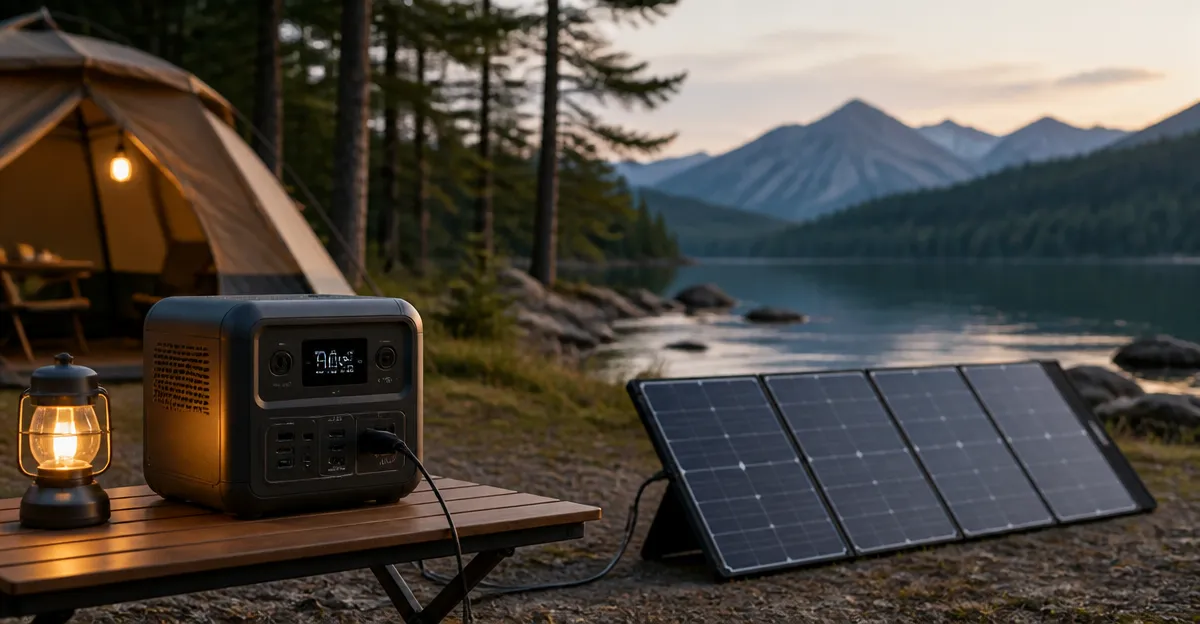
Place the power station on a stable, level surface away from the sleeping area. Elevating the unit on a small wooden pallet or a camping table can reduce vibration transmission to the ground. Additionally, surround the station with soft materials such as a folded blanket or a dedicated acoustic mat to dampen any residual sound.
The Anker SOLIX C1000 Gen2 is 14% smaller and 11% lighter than comparable models, making it easier to position in confined spaces without compromising stability. Its compact dimensions allow it to fit beneath a camp table while still providing 2000W of continuous power.
Step 4: Connect Solar Panels or Alternative Power Sources
If solar panels are part of the equipment list, connect them to the power station using the appropriate MC4 or Anderson connectors. Ensure that the panel array does not exceed the maximum input rating; the SOLIX S2000 accepts up to 400W of solar input, while the DELTA Pro can handle four 400W panels simultaneously. Align the panels toward the sun and secure them with adjustable brackets to maintain optimal angle.
When solar input is insufficient, use a wall outlet or a car charger as a secondary source. The Jackery Explorer 1000 v2 supports multiple charging methods, including a 1‑hour fast charge via the Jackery App. This flexibility ensures that the battery can be topped up quickly without extending the charging window into quiet hours.
Step 5: Manage Load Distribution During Charging
During the charging window, prioritize essential devices and defer non‑critical loads until after the station reaches a safe state of charge (typically above 80%). Use the built‑in power management features of the station to schedule high‑draw appliances such as a portable heater for after sunset, when the battery is already charged.
Both the SOLIX S2000 and the DELTA Pro provide multiple AC and DC outlets that can be allocated to specific devices. The S2000 includes eight outlets strategically placed on the front and rear, allowing users to separate always‑on appliances from those that can be turned off during charging. This separation reduces the instantaneous load and prevents the inverter from operating at peak noise levels.
Step 6: Monitor Battery Health and Charging Status
Utilize the manufacturer’s mobile application to track real‑time battery voltage, temperature, and remaining capacity. The apps for Anker and EcoFlow both display a graphical representation of charge cycles, enabling users to avoid deep‑discharge situations that could shorten battery lifespan.
Regular monitoring also assists in identifying abnormal noise patterns. If the inverter begins to emit a higher‑pitch whine, the app may flag an over‑temperature condition, prompting the user to reduce the load or improve ventilation.
Tips & Pro Tips
- Use a low‑noise tent fan to create white‑noise that masks any faint inverter hum.
- Schedule charging during the hottest part of the day to maximize solar efficiency.
- Employ a portable power strip with surge protection to consolidate multiple devices onto a single outlet, reducing cable clutter.
- Enable the “Eco Mode” or similar power‑saving setting on the station to limit output to the minimum required for essential devices.
- For extended trips, consider stacking additional battery modules (available for the DELTA Pro) to increase total capacity without adding a second inverter.
Troubleshooting
Problem: The power station continues to emit audible noise after the charging window.
Solution: Verify that the unit is placed on a vibration‑absorbing surface and that all ventilation openings are unobstructed. Reduce the load to below 50% of the rated output and observe whether the noise diminishes.
Problem: Solar panels are not delivering the expected charge rate.
Solution: Check panel orientation, ensure connectors are clean, and confirm that the total wattage does not exceed the station’s input limit. Use a multimeter to verify panel voltage under full sun.
Conclusion
Creating a quiet charging schedule for portable power stations at campsites involves careful planning, strategic placement, and the appropriate selection of equipment. By assessing power needs, aligning charging windows with daylight, and leveraging low‑noise models such as the Anker SOLIX S2000, campers can enjoy modern comforts while preserving the serenity of the outdoors. Implement the steps outlined in this guide, monitor battery health, and adapt the schedule as needed to ensure a peaceful and powered camping experience.
Products Mentioned in This Guide
Frequently Asked Questions
What is a quiet charging schedule and why is it important at campsites?
It is a plan to charge portable power stations during low‑noise periods, preserving campsite tranquility and complying with sound limits.
How can I determine the optimal charging times to minimize noise?
Check campground quiet hours, use off‑peak nighttime or early‑morning slots, and match charging duration to your device’s power draw.
Can solar panels be integrated into a quiet charging plan?
Yes, solar input charges silently during daylight, reducing reliance on noisy AC chargers and extending battery life.
Which portable power station features the quietest charging operation?
The Anker SOLIX S2000 is known for low‑noise charging thanks to its advanced LFP battery and efficient inverter design.
How does proper charging extend the battery life of my power station?
Avoiding deep discharges and using moderate charge rates reduces stress on cells, maintaining capacity over more cycles.