Introduction
Vanlife enthusiasts rely on portable power stations to run lights, appliances, and communication devices while on the road. However, improper storage and handling can create fire hazards that jeopardize safety and equipment. This guide explains the fundamentals of fire‑safe storage, outlines best‑practice strategies, and recommends products that enhance protection without sacrificing convenience. Readers will learn how to assess power‑station specifications, select appropriate carry cases, and implement routine maintenance to keep their mobile power sources reliable and secure.
Background and Context
Portable power stations are essentially large lithium‑based batteries equipped with inverters, charge controllers, and multiple output ports. The most common chemistries are lithium‑ion (Li‑ion) and lithium‑iron‑phosphate (LiFePO4). LiFePO4 offers a longer cycle life and greater thermal stability, which reduces the likelihood of thermal runaway—a primary cause of fire in battery systems. Understanding the battery type, capacity (measured in watt‑hours, Wh), and inverter rating (watts) is essential for safe integration into a van’s electrical architecture.
Fire safety in a confined vehicle hinges on three pillars: proper ventilation, physical protection, and monitoring. Ventilation prevents heat buildup; physical protection shields the unit from impacts and moisture; monitoring provides early warning of over‑temperature or over‑charge conditions. The following sections break down each pillar and recommend specific products that satisfy these criteria.
Key Concepts for Vanlife Power‑Station Safety
1. Thermal Management and Ventilation
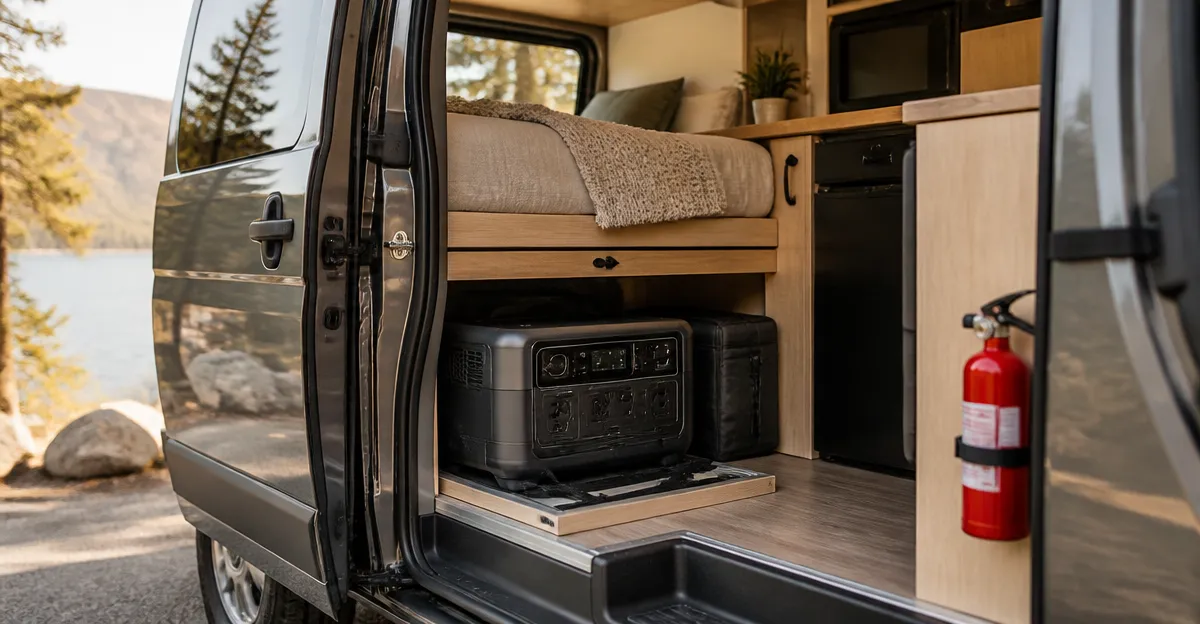
Power stations generate heat during high‑draw events such as running a refrigerator or an inverter at peak power. A well‑ventilated storage location—ideally with at least 2‑3 inches of clearance on all sides—allows heat to dissipate. Many units, such as the BLUETTI AC180, include an app‑controlled boost mode that can temporarily increase output to 2,700 W; this mode also raises internal temperature, making ventilation even more critical.
When installing a power station inside a van, consider mounting it on a vented shelf or using a dedicated compartment with passive airflow. Avoid enclosing the unit in airtight boxes, especially during charging, because the charging process can raise temperature by up to 15 W of inverter loss alone.
2. Physical Protection and Impact Resistance
Road vibrations, accidental drops, and exposure to dust or moisture are common in mobile environments. A robust carry case mitigates these risks. The LEFER‑Z Power Station Carry Case offers tear‑resistant, waterproof material, padded interior, and non‑slip foot pads that keep the unit stable during travel. Its eight pockets also organize cables, adapters, and manuals, reducing clutter that could otherwise cause tripping or short‑circuit hazards.
For units specific to Jackery, the Jackery Explorer 1000 v2 Carry Bag provides a custom‑fit design with side zippers for quick access and a padded lining that absorbs vibration. Both cases are lightweight enough to maintain overall van weight efficiency.
3. Monitoring and Smart Control
Modern power stations include Bluetooth or Wi‑Fi connectivity that feeds real‑time data to a smartphone app. The Jackery Explorer 1000 v2 features the Jackery App, which offers emergency boost charging, quiet overnight mode, and energy‑efficiency settings. Similarly, the Anker SOLIX C1000 Gen 2 provides a TOU (time‑of‑use) mode and a UPS switchover under 10 ms, enabling users to monitor temperature and battery health remotely. Regularly checking these metrics helps detect abnormal temperature spikes before they become dangerous.
Product Recommendations for Safe Storage
The following products have been selected based on their safety‑related features, user ratings, and relevance to vanlife scenarios.
Portable Power Stations
- Jackery Explorer 1000 v2 – 1,070 Wh capacity, 1,500 W continuous output, 3,000 W surge, lightweight at 23.8 lb, and equipped with ChargeShield 2.0 for rapid one‑hour emergency charging. Rated 4.7/5 from 3,643 reviews, it includes multiple USB‑C, USB‑A, DC, and pure sine wave AC ports, making it versatile for camping, road trips, and emergency backup.
- Anker SOLIX C1000 Gen 2 – 1,024 Wh capacity, 2,000 W continuous (3,000 W peak) output, HyperFlash 1,600 W fast recharge, and 10 ms UPS backup. It is 14 % smaller and 11 % lighter than comparable units, with a 4.7/5 rating from 1,665 reviews. The app‑controlled TOU mode helps manage peak‑hour consumption, reducing strain on the battery.
- BLUETTI AC180 – 1,152 Wh LiFePO4 battery, 1,800 W continuous (2,700 W peak) output, and a 1‑hour full charge capability at 1,440 W input. LiFePO4 chemistry provides superior thermal stability, essential for fire‑safe operation. It holds a 4.5/5 rating from 2,632 reviews and includes an app for detailed monitoring.
Carry Cases and Protection
- LEFER‑Z Power Station Carry Case – Compatible with multiple brands, including Jackery and Anker, this case measures 35 × 24 × 29 cm, features waterproof tear‑resistant fabric, padded interior, and eight storage pockets. Rated 4.6/5 from 1,067 reviews, it offers comprehensive protection for mobile use.
- Jackery Explorer 1000 v2 Carry Bag – Specifically engineered for the Jackery Explorer 1000 v2, the bag includes padded lining, abrasion‑resistant bottom strips, side opening zippers for in‑case operation, and a removable shoulder strap. It holds a 4.6/5 rating from 155 reviews.
Comparison and Selection Guide
Choosing the right power station and storage solution depends on three primary criteria: capacity, weight, and safety features. The table below summarizes key specifications.
| Product | Capacity (Wh) | Continuous Output (W) | Weight (lb) | Battery Chemistry | Fast‑Charge Time | Rating |
|---|---|---|---|---|---|---|
| Jackery Explorer 1000 v2 | 1,070 | 1,500 | 23.8 | LFP (Li‑Fe‑PO4) | 1 hr (emergency boost) / 1.7 hr (standard) | 4.7 |
| Anker SOLIX C1000 Gen 2 | 1,024 | 2,000 | ~22 (estimated) | LFP | 1.6 hr (1,600 W) | 4.7 |
| BLUETTI AC180 | 1,152 | 1,800 | ~30 (estimated) | LiFePO4 | 1 hr (1,440 W) | 4.5 |
When evaluating a carry case, consider compatibility, protective features, and weight. The LEFER‑Z Carry Case supports all three stations, making it a versatile choice for users who may upgrade or switch brands. For a dedicated solution, the Jackery Explorer 1000 v2 Carry Bag provides a snug fit and side openings that permit operation without removal—a valuable feature during emergencies.
Best Practices & Tips for Fire‑Safe Vanlife Power Use
- Maintain Clear Ventilation: Install the power station on a shelf with at least 3 inches of airflow on each side. Avoid covering the unit with blankets or rigid panels during charging.
- Use Dedicated Charging Modes: Activate quiet or energy‑efficiency modes when the van is stationary overnight. These modes lower inverter load and reduce heat generation.
- Monitor Temperature via App: Set alerts for temperature thresholds (e.g., 45 °C). Both Jackery and Anker apps provide real‑time temperature readouts.
- Secure the Unit During Transit: Place the power station inside a padded case such as the LEFER‑Z Carry Case or the dedicated Jackery bag. Ensure the case is strapped to a fixed anchor point to prevent movement during sharp turns.
- Regularly Inspect Connections: Check all cables for wear, corrosion, or loose plugs. Replace any damaged accessories immediately to avoid short circuits.
- Follow Manufacturer Charging Recommendations: Use the supplied AC charging cable and avoid exceeding the recommended input power. For the Jackery Explorer 1000 v2, the emergency boost mode should be enabled via the app before each rapid charge.
- Store at Partial Charge for Long‑Term Parking: If the van will remain idle for more than a month, store the battery at 50‑70 % state of charge to preserve lifespan, especially for Li‑ion models.
Frequently Asked Questions
1. Can I charge a power station with a solar panel while it is inside my van?
Yes, provided the panel receives direct sunlight. The Jackery Explorer 1000 v2 is compatible only with Jackery solar panels, while the Anker SOLIX C1000 Gen 2 accepts up to 600 W of solar input. Ensure the vented compartment allows airflow to dissipate heat generated during solar charging.
2. How long will a 1,000 Wh power station run a typical van fridge?
Most 12‑V compressor fridges draw 40‑60 W on average. A 1,070 Wh unit such as the Jackery Explorer 1000 v2 can operate the fridge for roughly 18‑25 hours, assuming 50 % inverter efficiency and no additional loads.
3. Is LiFePO4 truly safer than standard Li‑ion?
LiFePO4 chemistry is less prone to thermal runaway because its stable crystal structure tolerates higher temperatures. The BLUETTI AC180, which uses LiFePO4, is therefore considered one of the safest options for continuous van use.
4. Do I need a separate UPS for my power station?
Many modern stations incorporate UPS functionality. The Anker SOLIX C1000 Gen 2 offers a 10 ms switchover, ensuring devices such as CPAP machines experience no interruption during a power loss.
5. What should I do if my power station overheats?
Immediately disconnect any high‑draw loads, move the unit to a cooler, well‑ventilated area, and use the app to check temperature logs. If the temperature remains above the manufacturer’s safe limit after 10 minutes, contact customer support; both Jackery and BLUETTI have responsive service teams.
6. Can I store a power station in a waterproof bag?
Yes, but the bag must be breathable to avoid trapping heat. The LEFER‑Z Carry Case provides waterproof exterior material while allowing internal airflow through its mesh compartments.
Conclusion
Fire safety for vanlife power stations revolves around proper ventilation, physical protection, and diligent monitoring. By selecting a unit with reliable battery chemistry—such as the LiFePO4‑based BLUETTI AC180—and pairing it with a purpose‑built carry case like the LEFER‑Z Carry Case, van dwellers can enjoy the convenience of portable power without compromising safety. Regularly inspect connections, use app alerts, and follow manufacturer charging guidelines to extend battery life and minimize fire risk. With these practices in place, one can travel confidently, knowing that the power source is both reliable and secure.
Products Featured in This Guide
Jackery Explorer 1000 v2
Price: $499.00 | Rating: 4.7/5 (3,643 reviews)
Featured for its 1,070 Wh capacity, 1,500 W continuous output, rapid one‑hour emergency charging, and robust LFP battery that supports over 4,000 cycles.
Anker SOLIX C1000 Gen 2
Price: $499.99 | Rating: 4.7/5 (1,665 reviews)
Featured for its 2,000 W output, HyperFlash 1,600 W fast recharge, 10‑year InfiniPower warranty, and 10 ms UPS backup suitable for critical medical devices.
LEFER‑Z Power Station Carry Case
Price: $27.49 | Rating: 4.6/5 (1,067 reviews)
Featured for its universal compatibility, waterproof construction, eight storage pockets, and padded interior that protects power stations during travel.
BLUETTI AC180
Price: $449.00 | Rating: 4.5/5 (2,632 reviews)
Featured for its LiFePO4 battery, 1‑hour full charge capability, 2,700 W boost mode, and extensive app monitoring that aids fire‑safe operation.
Jackery Explorer 1000 v2 Carry Bag
Price: $32.99 | Rating: 4.6/5 (155 reviews)
Featured for its custom fit, side‑opening zippers that allow operation without removal, padded lining, and comfortable shoulder strap for on‑the‑road mobility.